Showing posts with label bluetooth. Show all posts

Friday, November 18, 2011

iPad EFB Gotchas


Pilots everywhere have been using iPads as Electronic Flight Bags for over a year now in all kinds of aircraft and some ... umm ... interesting incidents are starting to be reported. The iPad, combined with one of several EFB software packages, is a very useful device. But perfect it ain't. Here are a few common iPad gotchas and ways to avoid them.

Out-of-Date/Missing Charts

You haven't flown in a few weeks, so you make plans to get airborne, head out to the airport, but the weather isn't cooperating. You are IFR current so you launch your favorite EFB app to prepare an IFR flight plan only to learn your charts have expired. This happens more often than you might imagine, especially for infrequent flyers. If you have internet access, go ahead and start the update but expect a delay. If you don't have 'net access or if the access is really slow, you could be inconvenienced in a big way.


Solution? Do a dry run a day or two before you plan to go flying: Launch your EFB app and ensure your chart data is up-to-date. You can also keep track of the chart expiration dates in your electronic or paper calendar as a reminder so you aren't blindsided.

GPS Reception

If you purchased a 3G iPad and rely on its built-in GPS, you may find in some circumstances GPS satellite lock can be lost. Depending on the aircraft you fly and satellite coverage at a particular point in time, you may be fine or you may not. Of course you shouldn't be relying on your iPad for anything other than situational awareness, but losing GPS coverage can be seriously distracting at a high-workload moment.

Solution? Trying to keep your iPad from being shadowed by aircraft structures may help, but there are only so many ways you can hold your iPad in flight and still have it be usable. Another solution is to use an external, bluetooth GPS such the GNS 5870 MFI GPS Receiver or the newer Dual XGPS150 Bluetooth GPS Receiver  that comes with it's own rubber mat for laying on the glare shield. If you prefer a plug-in solution, the Bad Elf GPS Receiver  could be just the ticket.

Bluetooth Blues

Another distraction is discovering that your bluetooth GPS receiver is not connected to your iPad. I see this fairly regularly since upgrading to iOS 5.0.1, but futzing around with bluetooth settings isn't something you want to try while hand-flying in IMC.

Solution? I find going into the iPad settings, turning off bluetooth and then turning it back on to be the most reliable way to reestablish the connection. If you are using a bluetooth GPS receiver, make sure it is communicating properly with your iPad before you takeoff.

All EFBs are Equal?

Flying through the LA Basin is a heck of a time to discover that your chart app doesn't have a graphic depiction of the VFR transition that Socal is asking you to fly. If you're using ForeFlight and you don't have a back-up paper VFR terminal area chart (TAC), this could happen to you.


Solution? For one, Skycharts Pro does include the VFR TAC marginalia as well as the fly charts from the back of the TAC. If you haven't purchased that app then you may want to invest in a paper TAC or print out the necessary information from a site like SkyVector.

Hold Your Cards

If you own a 3G iPad and you rely on the built-in GPS, be advised that if the SIM card rattles loose you'll see a "no sim" alert and you'l loose GPS, too.

Solution? Reseating the sim card usually fixes this issue, but you might want to consider an external bluetooth or plug-in GPS as a back-up.

App Crash

Most iPad apps seem to be pretty stable, but having your EFB app crash at an inopportune time can be a real drag, especially during an instrument approach. Witnessing this happen to an instrument student of mine was an eye-opener. He not only had to re-launch the app and wait for it to initialize, he had to navigate back to the approach chart he was using.

Solution? There's no way to completely immunize yourself from app crashes, but there are a few preventative things you can do. Some folks feel it is a good idea to shutdown and restart your iPad every few days. Same goes for syncing your iPad on a regular basis. Next, become familiar with your EFB app's user interface while sitting in your living room in a nice comfy chair. If your EFB app allows you to mark favorite approaches or create binders of approaches for a trip, by all means use these features. Anything that helps you better organize charts will also help you locate those charts more quickly if you have to re-launch and start over.

Overheating

In hot weather it is possible for an iPad to overheat since the device is cooled solely by conduction. When this happens, the iPad shuts down until it cools off. You can't control the weather, but there are a few things you can do.

Solution? Put your iPad to sleep when you aren't using the display. Keep the iPad out of direct sunlight. During refueling stops, don't leave your iPad in the sun. Avoid folio cases that completely enclose the iPad and cases that are dark in color since they trap and absorb heat. If your iPad does overheat, get it out of the sun, direct a fresh air vent toward it, and wait.

Getting Juiced

The iPad has outstanding battery life, but the battery might not last very long if you forget to charge your iPad the night before you fly. The same problem can happen with external bluetooth GPS receivers, especially the GNS 5870 since its capacitive-touch power switch makes it all too easy to turn on accidentally.


Solution? Invest in a USB charger solely for use in the aircraft. Some adapters take a long time to re-charge the iPad, but at least they'll power the iPad and keep the battery from draining further. Turning the brightness down can also reduce the iPad's energy consumption.

What's Your Problem?

Had an interesting iPad technology moment? Post a comment and let others learn from your experience.

Friday, August 12, 2011

Long Odds, Happy Endings

Pilots, by and large, like to be in control and there are many ways to accomplish that goal. One way or another we have to manage risk if we're to maintain control. One way to manage risk is thoroughly planning each flight, but the best laid plans don't always pan out. Prudent pilots like to have more than one plan - the illustrious Plan B. There are folks out there who do little or no planning, just assuming that everything will be fine. Perhaps they are optimists or believe themselves to be Super Pilot, capable of handling anything than arrises. Having one or more back-up plans, just in case, is a wise choice because the unexpected is always waiting for us. It's all a matter of odds.

Rushed and Forgotten

A busy schedule recently had me instructing in seven different aircraft types in seven days. Long hours and fatigue are not good ingredients for beginning a safe flight. That crossed my mind as I was running out the door last week to head to the airport. It also crossed my mind that my minimalist flight bag felt lighter than usual. This was just a passing thought until, settling into the right seat of the aircraft in which I was about to instruct, it became obvious why my flight bag was so light. I'd left my iPad at home and so it was time for an unplanned test of my back-up strategies: Using my iPhone and the minimal selection of paper charts I keep in my flight bag.

SkyCharts Pro and ForeFlight work just fine on the iPhone, though there's no GPS to be had. That's because, being a good citizen, I put my iPhone into airplane mode before takeoff and that disables bluetooth. Not to worry because plan B was the very capable panel-mounted GPS receiver in the aircraft.

With the iPhone I can do virtually everything normally done on the iPad with the main disadvantage being the small size of the iPhone's screen. There were a few more differences: I haven't enabled multi-tasking gestures on my iPhone and some of the user interface details of ForeFlight are different from the iPad version. I appreciate a good challenge so it was time to adjust, adapt, and overcome.

Taking Notes, iPhone style

My weapon of choice for writing notes in flight is the iPad app Penultimate, but it isn't supported on the iPhone. Turns out there is a free iPhone app that offers similar features. Sure, I had to write smaller letters and use more pages, but Handwriting worked surprisingly well. There's no erase or undo. If you make a mistake, just start a new note. Did I mention it's a free app?


Back-up Paper Charts

Printing paper copies of local terminal procedures should be a part of every iPad pilot's back-up strategy. For me, nothing beats ReadyProcs, a Java-based app that runs on a bunch of different operating systems. I print out a selection of charts, in booklet format, staple them and slip them in my flight bag. No muss, no fuss.


In the unlikely event of an iPhone failure, I still have a basic complement of paper charts.


All in SloMo

Lately I've been fortunate to teach occasionally in a new, air conditioned Cirrus and the AC certainly does reduce fatigue in hot weather. Climbing out on top of a Bay Area cloud layer, I watched as my GNS 5870 bluetooth receiver came unstuck from dashboard, fell between my knees, glanced off the carpeted shroud that covers part of the AC (the evaporator unit, I think) under the right front passenger seat, before it disappeared with an odd rattle. Moving my seat back and feeling around confirmed my worst suspicion: My bluetooth GPS must have fallen through one of the numerous gaps in that shroud. It would have to be retrieved once we were back on the ground.

The interesting part was that in spite of being shielded by a fair amount of metal, the seat itself, and 175 pounds of pilot, the GNS 5870 kept satellite lock for the rest of the flight. The iPad continued to show the same ground speed and location as the G1000. Pretty remarkable ...

Back on earth, it became clear that tools would be required to retrieve the GPS. I carefully removed two bolts from the front of the AC shroud, but another fastener underneath the right seat still held the shroud in place. Uncomfortable with the idea of removing the seat, I was able to lift the front of the shroud enough to see the GNS 5870 lodged on the inboard side of the AC equipment and retrieve it. We replaced the two bolts and I intend to try leaving the GPS in my shirt pocket while flying air conditioned Cirrus aircraft!

Something New under the Sun

Pilots who rely on GPS got a wake-up call recently as increased solar flare activity began to affect GPS and WAAS signal integrity. It's important to remember that GPS, like any navigational system, has limitations. Solar activity can affect GPS signals and that's just what happened last week.

WAAS LPV availability on 8/6/2011

Things are mostly back to normal, but the Northeast and the Upper Great Lake states appear to have been most affected on the date shown. The unusual solar activity is forecast to continue. Regardless of where you live, be ready to navigate by alternate means and don't count on getting LPV minima on RNAV approaches. To access the current status of the LPV service volume (along with other cool GPS stuff), you might want to bookmark this link.

Power of ... Love

After our basenji Hunter passed away in 2008, we waited a year before deciding to get a new dog through Basenji Rescue and Transport (BRAT). We adopted a pair of tricolor basenji about 2 1/2 years ago and though it was initially challenging, it has been immensely rewarding. When Rio and Kadee (aka Taz) came to us, a lot of training and compassion were required. We were Rio's fifth home and it was clear that someone along the way had been unkind to him. He was very mistrustful of men, in particular, and easily frightened. Unwinding his fearful behavior required a lot of patience.

Kadee came to us with the name Taz and though she became comfortable in our home, she remained aloof and distant. After about a year, it occurred to me to try calling her by her original name, Kadee. The results were remarkable and if you ask me, anyone who says dogs don't have long memories is mistaken.

Here's a photo of Rio and Kadee, taken shortly after they'd come to live with us. I'd forgotten how underweight Rio was at the time - just under 20 pounds.


Here's a photo from last week. Kadee is more attentive and Rio now weighs in at a normal 24.5 pounds. In a highly competitive society, it's good to stop and remember that care, attention and love can overcome even longest of odds.


Sunday, February 13, 2011

GNS 5870 Bluetooth GPS for iPad


When the iPad was first released, the only way to use it with a bluetooth GPS appeared to involve jailbreaking and that wasn't something I was keen on doing. Ten months later there are at least two GPS devices for use with the iPad, both claim to be Apple-approved, and neither require jailbreaking. One is the Bad Elf GPS receiver and another is the GNS 5870. Both sell for around $100USD and both are said to work with the two electronic flight bag (EFB) apps that I use most often - ForeFlight Mobile HD (FFM) and Skycharts Pro (SCP). Saving my pennies and skipping soy lattes at Peet's Coffee finally paid off in the form of a new bluetooth GPS receiver for use with my non-3G iPad.

It should go without saying, but I'll say it anyway: The combination of any GPS receiver with an iPad or any other off-the-shelf computer hardware is no substitute for a TSO C125 or C145/146 IFR-certified GPS receiver. Anyone who claims otherwise needs professional help.

I decided against Bad Elf since it plugs into the iPad's 30-pin connector, a location that would seem to be a disadvantage in two respects. A small unit plugged into the iPad would seem to be susceptible damage for an iPad kneeboard arrangement. And with the iPad on one's lap or knee while seated in an aircraft, I can't imagine the Bad Elf is going to offer optimal GPS satellite reception. Siting outside, walking, or hiking, Bad Elf would probably perform just fine. Inside an aluminum, quasi-Faraday cage, not so much.

Satellites in Sight

The GNS 5870 is a small 32 channel bluetooth GPS receiver made by Global Navigation Systems GmbH. Physically it is a little bigger than a box of matches and weighs less than a set of car keys. Since it connects to the iPad via bluetooth, you can mount the receiver where satellite reception is likely to be best, such as near the windscreen. The unit is powered by a Li-Ion battery that is purported to last at least 10 hours. It comes with a mini-USB cable and USB cigarette power adapter. I wondered if routing the cable in an aircraft might be a bit of a challenge, but it turned out to be workable. The size of the cigarette adapter means it protrudes quite a bit, making Cessna's design decision to put the cabin power plug right above the fuel selector seem dubious, at best.


One issue some users have with the GNS 5870 has to do with the power switch, which is an unconventional touch sensor. Holding the unit with the display on on your left, turn it on by swiping your finger upward across the face of the display. To turn it off, swipe your finger downward. At first I had a bit of trouble turning the unit off, but discovered that a light touch and a relatively slow swiping motion was all that was required. It's easy to inadvertently turn the unit on and drain the battery, though I found a simple solution which I'll describe later. I'll second the observation others have made: A conventional power switch would have been a wiser choice, though not nearly as cool.


Developing Attachments

Once the unit is turned on, go to the iPad's Settings, ensure that bluetooth is enabled, and connect to the device. After putting my iPad to sleep during a fuel stop, I found that the bluetooth connection had been lost. I had to access the bluetooth Settings again to reconect the GNS 5870. This wasn't a repeatable problem. Hmm ... Otherwise, I found I could switch between apps on the iPad without disturbing the bluetooth connection.


There are several options for mounting the GNS 5870, but to avoid running afoul of FAA STC requirements you'll probably want something temporary like velcro. Since I fly in a variety of aircraft, my mounting solution is museum putty. Just a small bit of putty on the unit will temporarily and securely adhere it to most any surface. I used to recommend a putty product that Garmin marketed, but they seem to have discontinued it. No worries because the museum putty is less expensive that what Garmin used to sell - surprise!


To keep the putty from sticking to the inside of my flight bag, a wrapper of baking parchment (not to be confused with wax paper) works nicely. The putty doesn't stick to the parchment and it also acts as a wrapper that helps keep the device from being turned on by accident while it's stored in my flight bag.


Useful and Reasonably Accurate

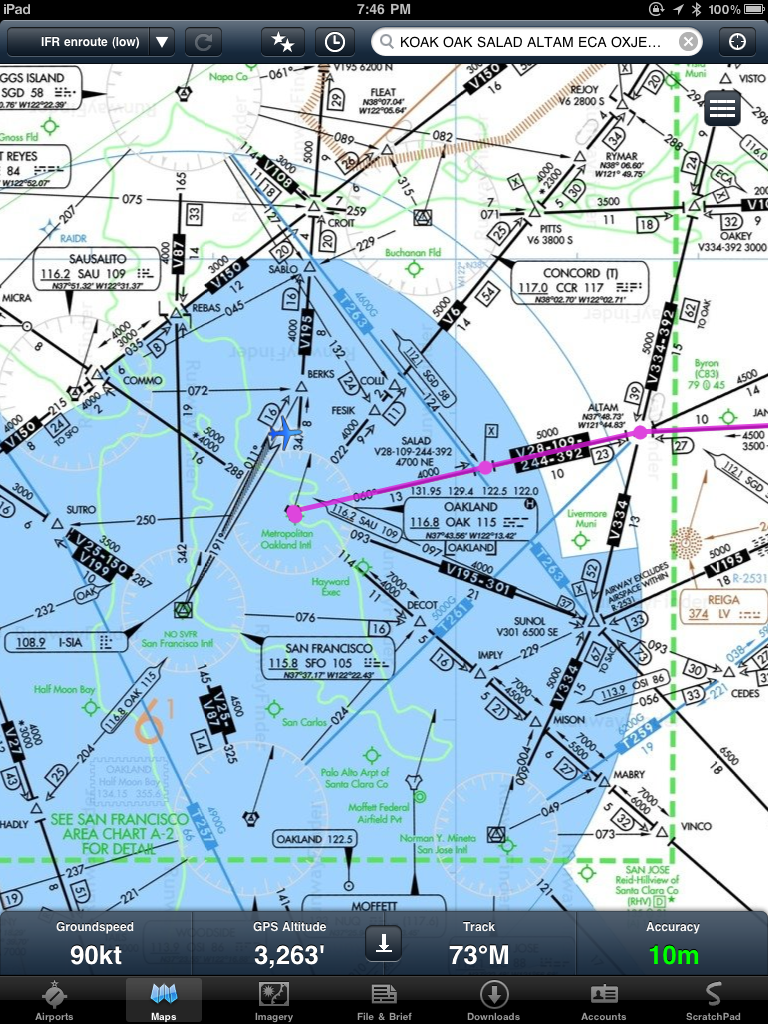
I tried the GNS 5870 with both FFM and SCP with good results. Headed down SF Bay on a flight from Oakland to Monterey, the FFM display showed 10 meter accuracy and both apps displayed ground speed and current track readouts that closely or exactly matched the values shown on the G1000 multi-function display (MFD) and primary flight display (PFD).

In the examples below, we were being vectored and then were told to proceed direct KNUQ which is why the G1000 course line and the FFM course line are not coincident.

G1000 MFD, Track Up
ForeFlight Mobile HD, North Up
Skycharts Pro offers the ability to display either North Up or Track Up and also provides the distance and bearing to the airport nearest to your current position, though bigger numbers would be easier on my aging eyes.

Skycharts Pro, North Up
Skycharts Pro, Track Up


The main advantage of the GNS 5870 is keeping your place on an en route chart displayed on an iPad. Neither FFM or SCP provide geo-referenced terminal procedures or airport diagrams, but both apps provide a subset of features you'd expect from a hand-held GPS receiver. SCP goes the extra mile and provides both desired track and current track as well as distance and time to the next waypoint. Neither app provides turn anticipation, a way to suspend waypoint sequencing, nor a way to define and display holding patterns.

Just as an experiment, I entered some of the waypoints that define the SCK RNAV (GPS) RWY 29R approach and found the GNS 5870's positional accuracy was quite good. The distance to the current waypoint actually matched the G1000 exactly, there was just a time lag between my taking the photo of the MFD and the iPad screen shot.


Both of these EFB apps display the GPS navigation data at the bottom of the iPad's screen and with the iPad in your lap you'll need to be vigilant about increased head-down time. Though the ground speed, track and GPS-derived altitude seem pretty accurate, I can't imagine using these displays to actually control an aircraft and I'm sure the developers (and their lawyers) would concur.


Conclusions

The GNS 5870 works well enough to make me consider trying one of the newer, lightweight RAM yoke mounts for the iPad to help ameliorate head-down tendencies. Guess I'll have to save more pennies and forego more soy lattes. The bottom line is that while this sort of GPS solution could help you avoid class bravo or visually acquire a unfamiliar airport, finding a runway at the end of an instrument approach is still the job for an IFR-certified GPS.

Related Posts Plugin for WordPress, Blogger...